I Tried Every AI Excel Add-in So You Don't Have To (2026 Comparison)
GPT for Work, Melder, Microsoft Copilot, and AI for Excel compared on price and real spreadsheet work — by the person who built one of them. Spoiler: some of these cost 5x more than others for the same job.
Let me get the disclosure out of the way first: I built AI for Excel, so of course I have a horse in this race. But I also spent real money on every competitor in this post — my actual card, my actual spreadsheets — because I need to know what I'm up against. What follows is what I found, with prices from each vendor's own pricing page as of July 2026. If a price has changed by the time you read this, check their sites; I'll try to keep this updated.
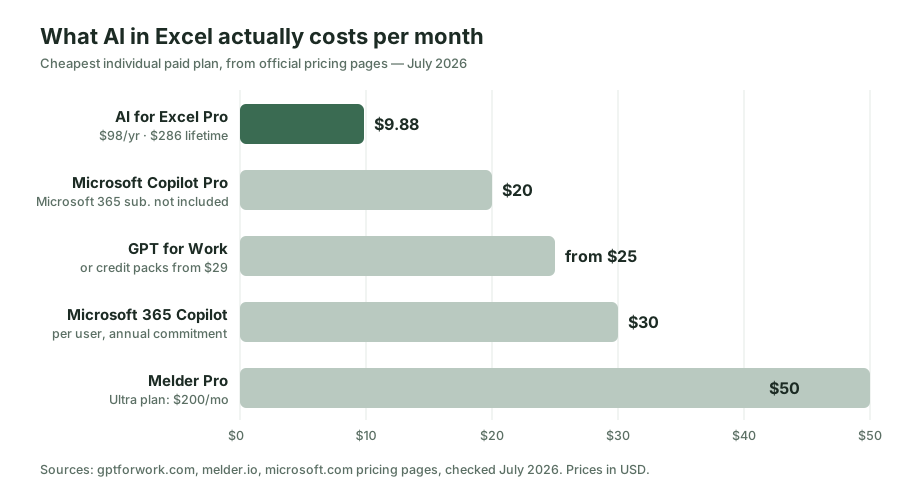
Here's the short version: the AI Excel add-in market has quietly split into a $10 tier, a $25–30 tier, and a $50+ tier, and after months of using all of them, I can't find a workload where the expensive tiers do meaningfully better work for a normal spreadsheet user.
The contenders, in one table
| AI for Excel | GPT for Work | Melder | Microsoft Copilot | |
|---|---|---|---|---|
| Entry paid price | $9.88/mo ($98/yr) | from $25/mo or $29 credit packs | $50/mo (Ultra: $200/mo) | Pro $20/mo · M365 Copilot $30/user/mo |
| Free tier | Yes | Yes (limited) | 7-day trial only | No standalone free tier |
| Agent that edits your sheet | Yes, with auto-backup | Yes | Yes | Partially (varies by plan) |
| Bring your own API key | Yes, and it's a first-class feature | Yes ($1/1M token platform fee) | No | No |
| One-time purchase option | Yes ($286 lifetime) | Credits expire after ~12 months | No | No |
| Works without a Microsoft 365 subscription | Yes | Yes | Yes | No |
Now let me tell you what the table doesn't.
GPT for Work: the veteran that got expensive
GPT for Work (you may know it as GPT for Excel) is the elder statesman here — it's been around since the ChatGPT-in-a-spreadsheet idea was new, it's polished, and it works in both Excel and Google Sheets. I genuinely respect it.
My problem is the math. The subscription starts at $25/month. The pay-as-you-go alternative starts at a $29 credit pack, and those credits are only guaranteed valid for 12 months. And if you bring your own OpenAI or Anthropic API key — meaning you're already paying the model provider directly — GPT for Work still charges a $1 per million token platform fee on top.
That last one is the part I can't get over. Charging a toll on tokens I'm already buying from someone else feels like paying a delivery fee on groceries I picked up myself. When I added BYOK to my own product, I made it the opposite: bring your own key and the platform gets out of your way. That's the whole point of bringing your own key.
If you live in Google Sheets as much as Excel, GPT for Work's dual-platform support is a real argument for it. If you're an Excel person, I don't think the price is justified anymore.
Melder: impressive agent, painful invoice
Melder is a YC-backed Excel agent, and credit where it's due: the agent is capable, and the team clearly knows what they're building. If you're a hedge fund analyst whose employer pays for tools, stop reading and go try it.
For everyone else, the pricing page is where the conversation ends. Pro is $50/month. The Ultra tier is $200/month — more than most people's entire software budget. There's no free tier beyond a 7-day trial, no bring-your-own-key option, and credits reset every month whether you used them or not.
Fifty dollars a month is $600 a year for an Excel assistant. I keep asking myself what an add-in has to do to be worth 5x its competitors, and the honest answer from my testing is: nothing I could find. The gap between a $10 agent and a $50 agent in 2026 is nowhere near 5x, because everyone is calling the same handful of frontier models under the hood. You're not paying for a smarter brain; you're paying for their margin.
Microsoft Copilot: the default that isn't cheap
Copilot has the enormous advantage of being built in. No add-in to install, IT already approves it, and it keeps getting better.
But look at what it actually costs to get Copilot working in Excel. Copilot Pro is $20/month — on top of the Microsoft 365 subscription you already need. The business version, Microsoft 365 Copilot, is $30 per user per month with an annual commitment. For a 5-person team, that's $1,800 a year before anyone opens a spreadsheet.
And in day-to-day Excel work, Copilot is still the most conservative tool in this list. It's cautious about editing cells, frequently answers with suggestions rather than actions, and you can't choose which AI model it uses — you get what Microsoft gives you. It's the safe corporate choice, and it prices like one.
Where AI for Excel fits (and why it's $9.88)
People sometimes ask if the low price means a weaker product, so let me explain the economics instead of just claiming otherwise.
The expensive tools in this list are all doing the same fundamental thing: sending your request plus some sheet context to a frontier model, getting instructions back, and applying them to the workbook. The models are the expensive part, and model prices have been falling for three years. A $50/month price tag isn't covering model costs — it's covering go-to-market.
I priced AI for Excel Pro at $9.88/month, $98/year, or a $286 one-time lifetime purchase, because that's what the product costs to run plus a margin I can sleep on. On top of that:
- The free tier is a real free tier. You can do actual work on it, not a 7-day countdown.
- Bring your own API key, pay nothing extra for it. Your key, your provider bill, no platform toll. You can even add multiple custom models and switch between them.
- Every write is backed up automatically. The agent snapshots your workbook before touching a cell, so "undo what the AI did" is one click. I built this feature first, before the fancy stuff, because it's the one that lets you trust an agent at all.
- The lifetime option exists because I personally hate subscription creep, and I suspect you do too.
So which one should you pick?
An honest guide, including when not to pick mine: if your company already pays for Microsoft 365 Copilot, use it — free-to-you beats everything in this post. If you split your life between Google Sheets and Excel, GPT for Work's cross-platform support may be worth its premium. If you're at a fund with a tooling budget and want the most autonomous agent regardless of cost, evaluate Melder.
If you're anyone else — an analyst, an operations person, a founder, a student, anyone who pays for their own tools and wants AI to actually do the spreadsheet work — try the free tier of AI for Excel and see if you ever hit its ceiling. It's a five-minute install, and the price will not be the thing that stops you.